


LavinMQ 2.10: MQTT-native access control with topic permissions

LavinMQ 2.10 adds topic permissions to the MQTT broker: MQTT-native authorization, or ACLs, that control which topics a client is allowed to publish and subscribe to. Rules are written with the same topic filters your clients already use, so if you’ve set up access control in another MQTT broker, most of this will feel familiar.
LavinMQ began as an AMQP broker, which shaped how we built MQTT support, and topic permissions are where that started to change. This post is about how we thought about it while building: why we built it the way we did, and the details we wanted to get right.
Letting MQTT stand on its own
When we first added MQTT to LavinMQ, we built it on top of our AMQP mechanics. I still think that was the right call at the time. We got a working MQTT broker without making big waves in the codebase, and we quickly got an idea of how people wanted to use it.
The trade-off is that everything is really AMQP underneath. Topic permissions are a good example. They’re standard in most MQTT brokers, and something we’ve wanted in LavinMQ for a long time. We could have built them on top of AMQP too, but when we started designing them it became clear that would make for an awkward user experience. So we started breaking the MQTT broker out to stand on its own.
That’s a bigger change than the feature itself, but it lays the groundwork for building things the way we think they should work for MQTT, rather than the way AMQP happens to allow.
Topic permissions in practice
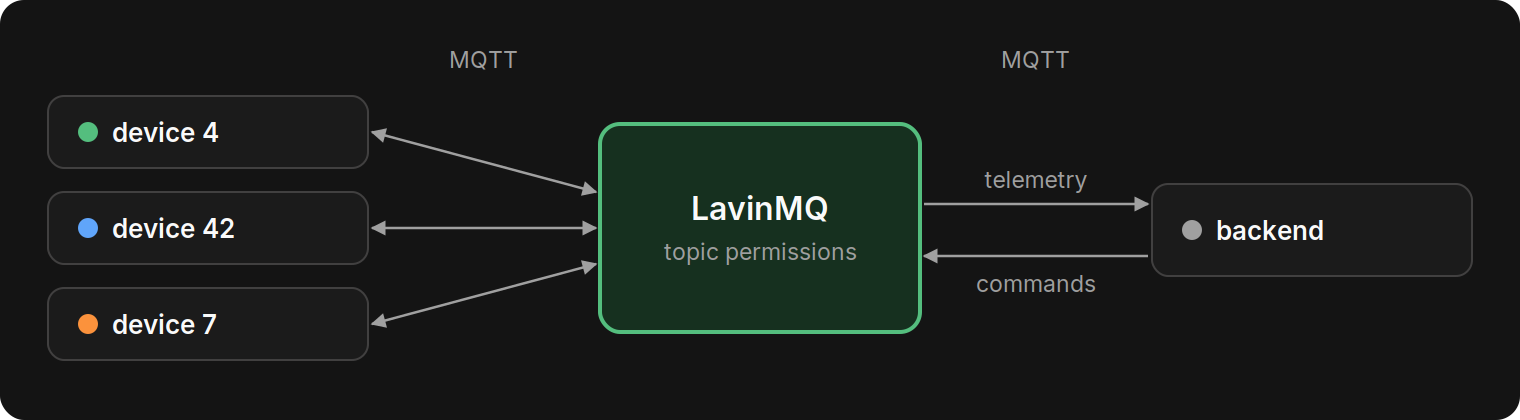
Before we get into the details, here’s the setup we’ll use throughout this post, a small IoT fleet: devices publish to devices/<id>/telemetry and receive commands on devices/<id>/commands, and a backend service reads all telemetry and sends commands.
Groups, members and rules
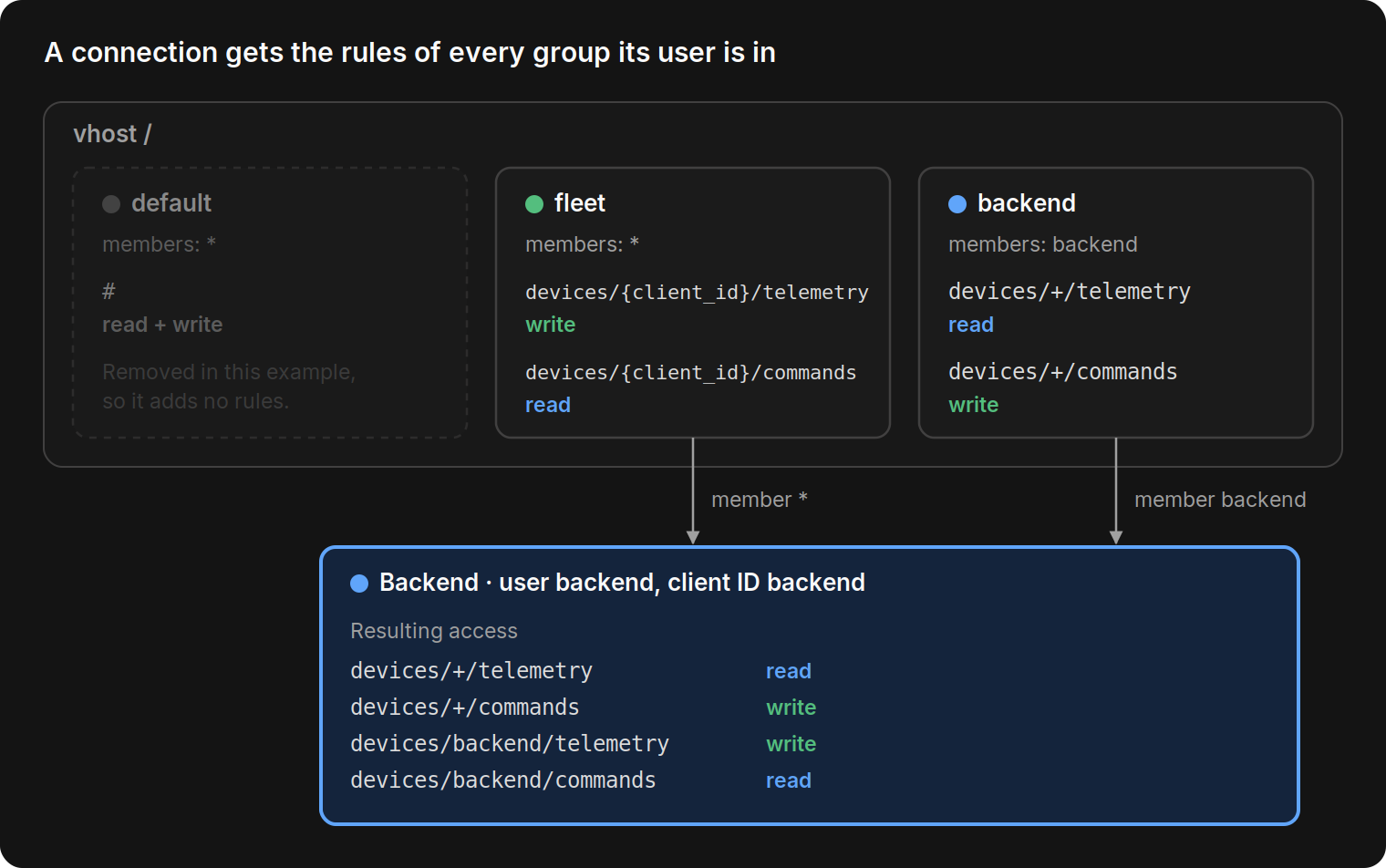
A topic permission is a rule: a topic filter such as devices/+/telemetry, with a read flag, a write flag, or both. Rules are collected in permission groups, and each group has a list of members. A member is a username, or * for every authenticated user. Groups belong to a vhost, and when a client connects it gets the rules of every group its user is a member of. If a vhost has no groups at all, every topic is denied.
We also didn’t want a version upgrade to 2.10.0 to break anyone’s existing clients. So every vhost starts with a default group that allows #, and nothing changes until you decide it should. When you’re ready to lock things down, remove that group or narrow its rule.
While designing all this, a handful of things came up that we really wanted to get right to provide the best user experience. Here are some examples.
Rules are MQTT topic filters, not regexes
We think LavinMQ should provide a natural experience for someone who is used to MQTT platforms. Therefore, rules are written in the same syntax your clients already use to subscribe, for example devices/+/telemetry. If you’ve written a Mosquitto ACL file or set up authorization in EMQX, this will feel familiar: topic filters, read and write per rule, and a placeholder for the client ID.
The difference is in how you manage them. LavinMQ rules are grouped per vhost and changed through the HTTP API, so there’s no ACL file to edit and reload. We wanted to avoid regexes on queue or exchange names, or needing to translate your topic tree into something else. Topic access comes from the permission groups a user belongs to, and beyond that, a user only needs a vhost permission entry to connect.
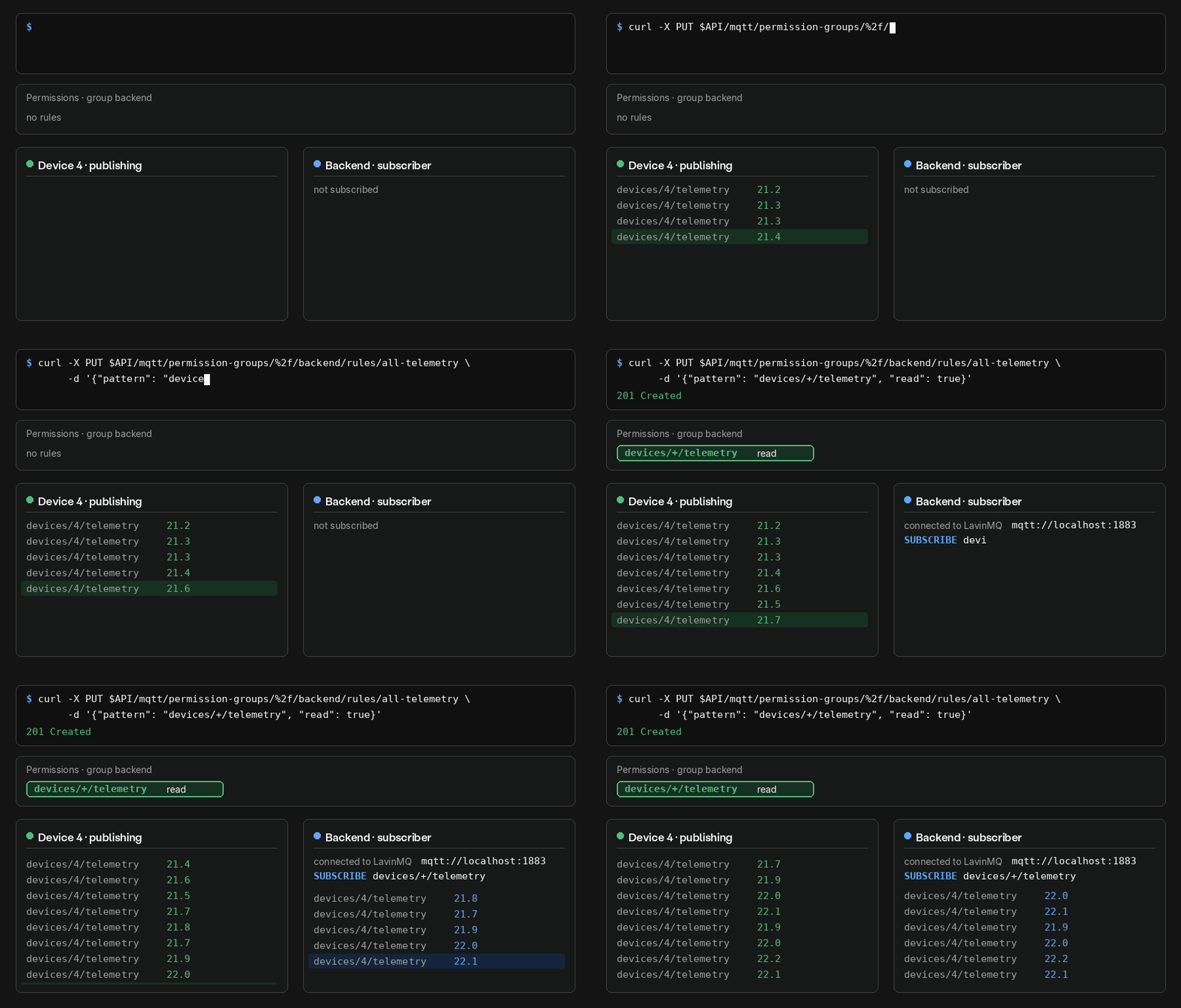
Below is a basic example where one API call adds a read rule for the backend, which then subscribes and starts receiving device 4’s readings.
Shared rules with {client_id}
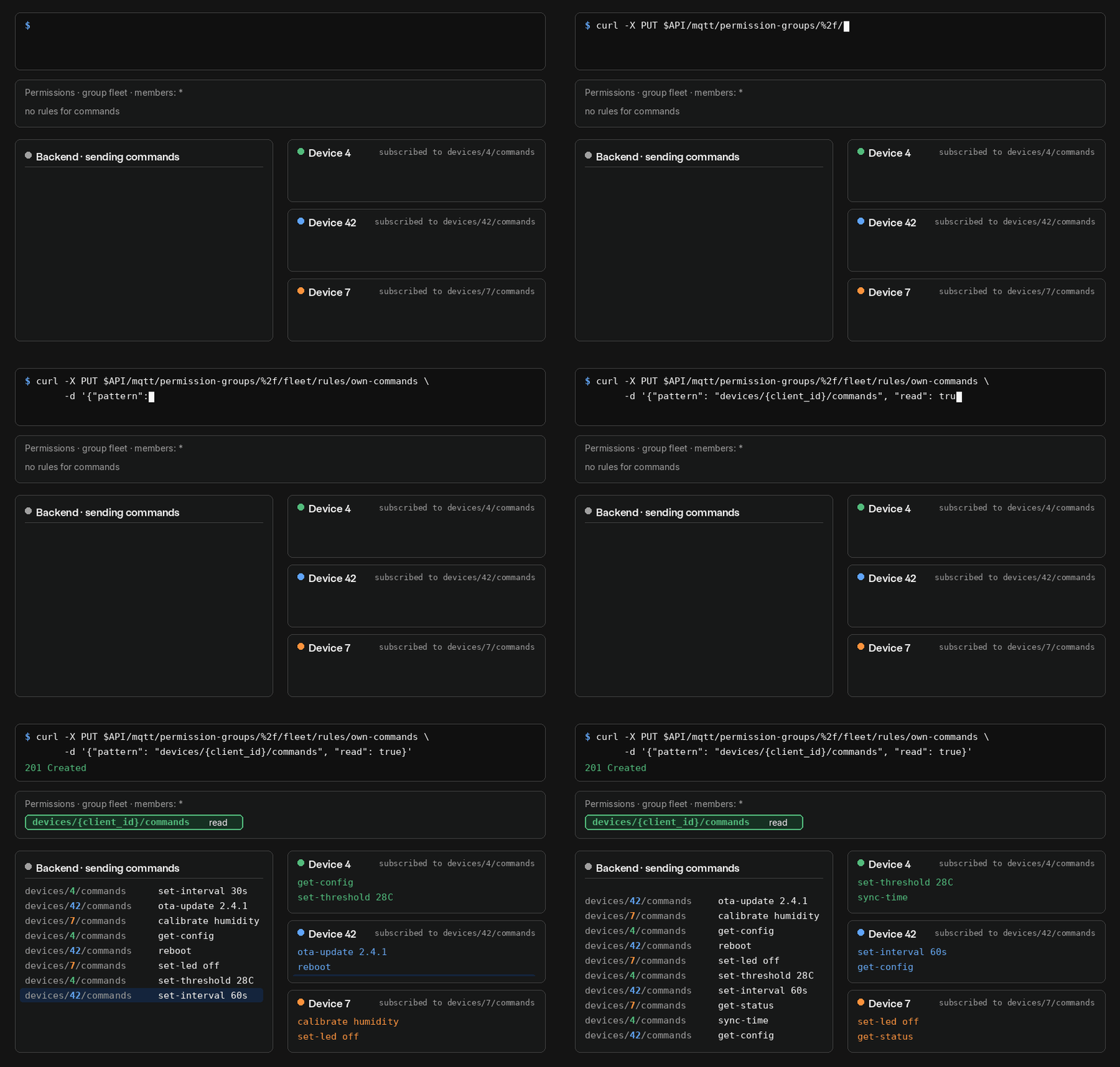
Next, we wanted it to be simple to add a device to an already living system. Most fleets follow the same pattern for every device, and it felt wrong to make people add a new rule each time one comes online. So a single group with member * and a rule like devices/{client_id}/commands covers all of them, while each device only gets access to its own subtree.
If you’ve used %c in a Mosquitto ACL or ${clientid} in EMQX, it’s the same idea. When you add a device, you add its user and vhost access, and the existing rule already applies.
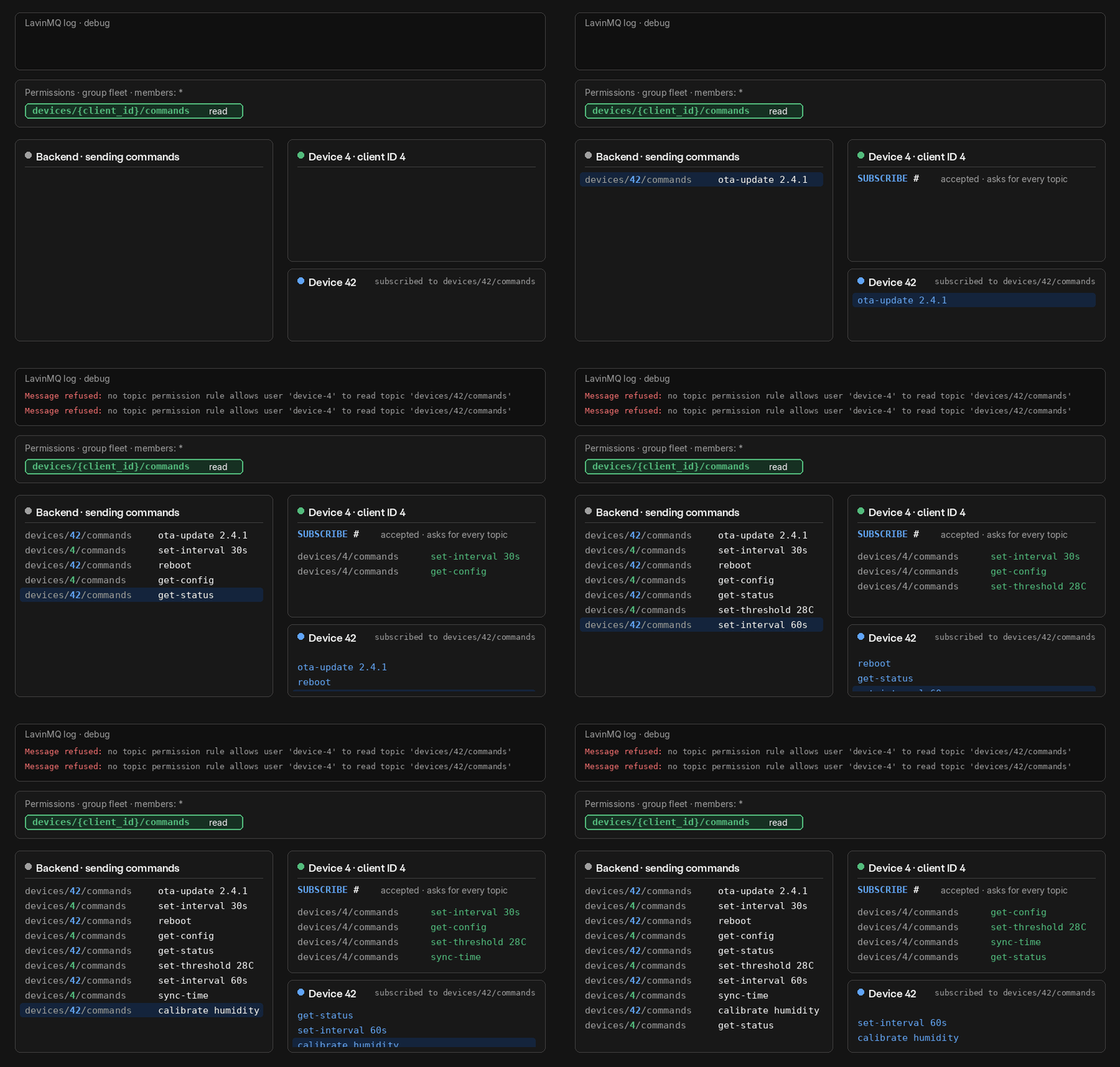
Below is an example where the backend sends commands to three devices, and each one receives only its own.
Level-based matching
A permission for one device should never quietly cover another. With regex-based rules, we’ve found that’s surprisingly easy to get wrong: forget a single anchor, and device 4’s rule also matches device 42. Topic filters avoid that problem: rules are matched one topic level at a time, never as plain strings.
Client 4’s rules can never match devices/42/..., because 4 and 42 are different topic levels, and that holds for wildcard subscriptions too. In the example below, device 4 subscribes to # and still receives only its own commands, while every message meant for device 42 is refused and logged.
Forbidden topics don’t close the connection
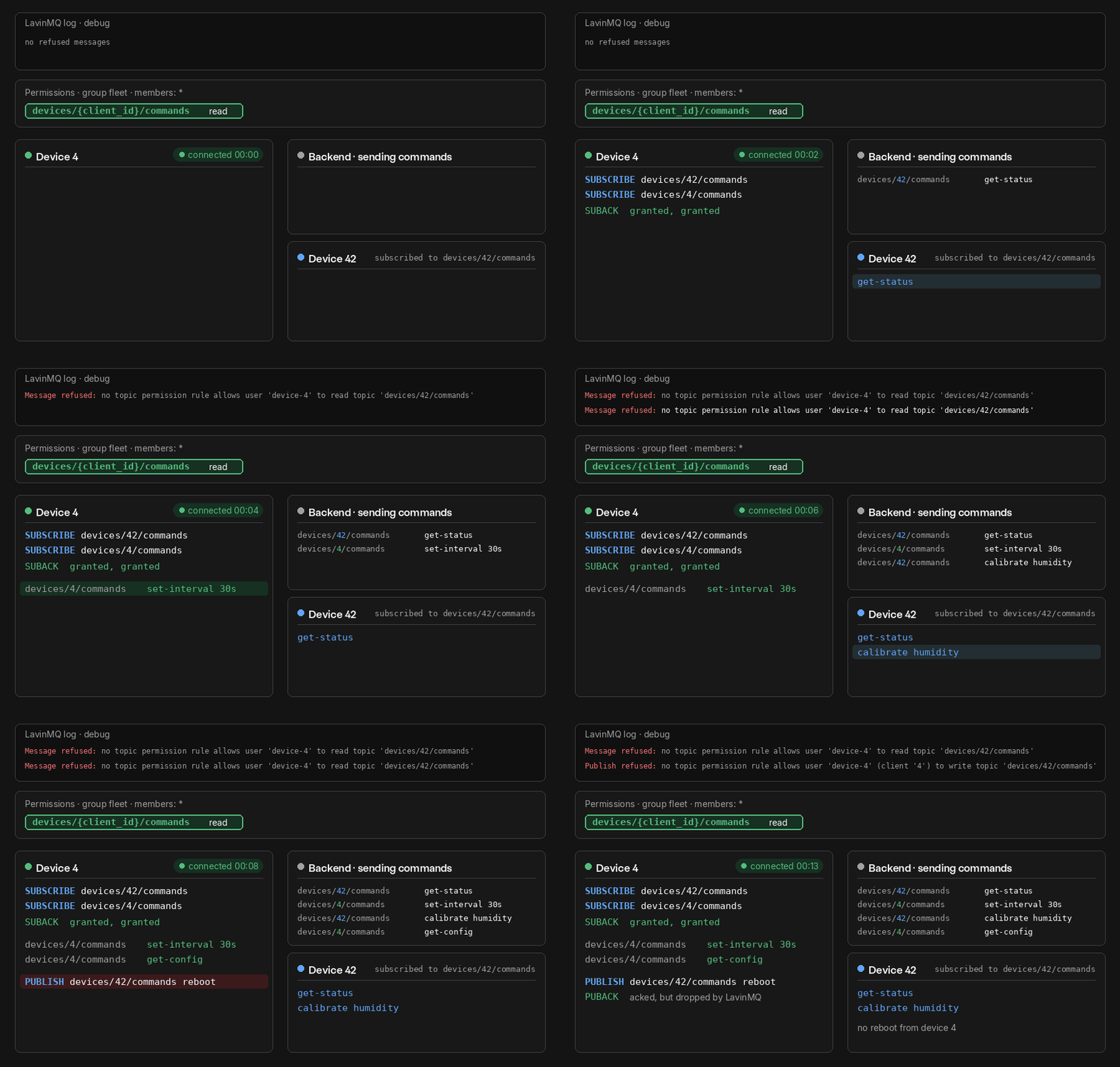
We also didn’t think that trying a forbidden topic should take the device offline. A device with one wrong subscription should keep working for everything it’s allowed to do. So LavinMQ accepts every SUBSCRIBE and checks read access on each message, the same way Mosquitto does, and a client only receives what it’s allowed to read.
A forbidden publish is acked and dropped. Silent failures are no fun to debug, though, so each refusal is logged at debug level.
Authorization changes apply without reconnecting
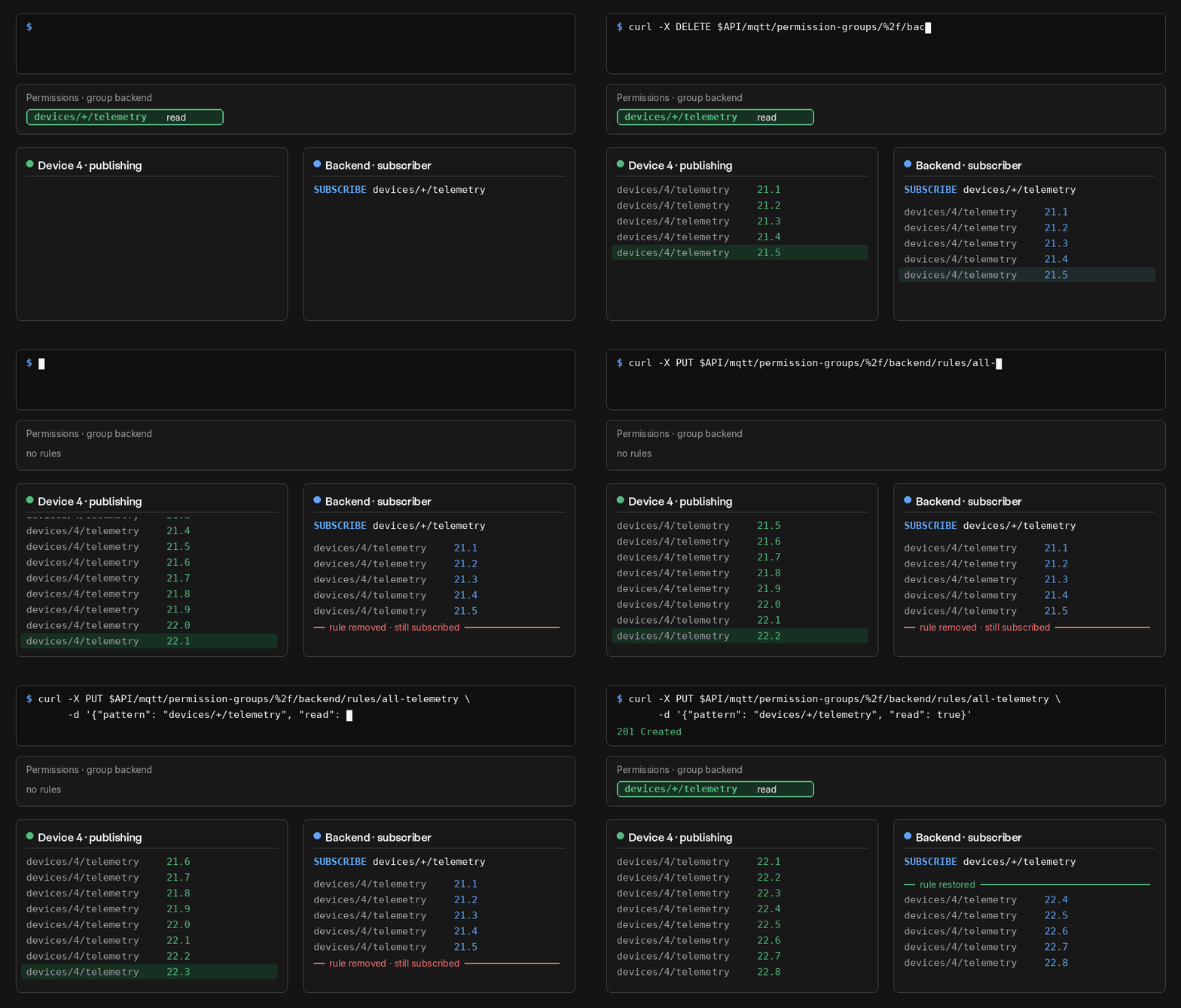
Finally, when you revoke access, we think it should take effect right away, not the next time a client happens to reconnect. So permission changes apply immediately to connected clients: removing a rule stops delivery to an active subscriber, and restoring it resumes delivery.
Below, the backend stays subscribed the whole time while its read rule is removed and restored.
What’s next?
Topic permissions are a good example of a feature we can confidently deliver now that we let MQTT stand on its own. We’re excited to keep investing in an MQTT-native direction and to keep building out our MQTT platform, and we’re already working on what comes next: MQTT 5 support and exchange-to-exchange bindings.
If you want to play around with topic permissions, the MQTT documentation walks through the API, and the 2.10.0 release notes have the full list of changes. We’d love to hear how it works for your setup.
Summary
LavinMQ 2.10 adds topic permissions to the MQTT broker. You can now control which topics a client is allowed to publish and subscribe to, using the same topic filters your clients already use. Rules are organized in permission groups per vhost: you add users to a group, and every rule in that group applies to them.
A user can belong to several groups and gets the combined rules of all of them. Rules are matched one topic level at a time, and changes take effect immediately on connected clients. No regexes on queue names, and no translating your topic tree into AMQP terms.
Frequently asked questions
Does LavinMQ support MQTT ACLs?
Yes. From LavinMQ 2.10, topic permissions let you control which topics each MQTT client can publish and subscribe to. You write rules with standard MQTT topic filters, such as devices/+/telemetry, and collect them in permission groups per vhost.
How do I restrict each MQTT device to its own topics?
Create a permission group with the member * and a rule like devices/{client_id}/commands. Each device then gets access only to its own subtree, and new devices are covered automatically when you add their user.
Can a rule for one device accidentally match another?
No. LavinMQ matches rules one topic level at a time, never as plain strings. A rule for device 4 can’t match devices/42/..., even with wildcard subscriptions.
What happens when a client uses a topic it isn’t allowed to?
The client stays connected. LavinMQ accepts every subscription but only delivers messages the client is allowed to read. A forbidden publish is acknowledged and dropped, and each refusal is logged at debug level.
Do permission changes apply to clients that are already connected?
Yes. Changes take effect immediately, so removing a rule stops delivery to an active subscriber right away, without waiting for a reconnect.
Will upgrading to LavinMQ 2.10 break my existing MQTT clients?
No. Every vhost starts with a default group that allows #, so nothing changes until you remove that group or narrow its rule.
Does LavinMQ support MQTT 5?
Not yet. MQTT 5 support is the next thing we’re working on.
Christina Dahlén