


Configuring queues and exchanges with policies

Policies apply arguments to one or many queues and exchanges at once. When a policy is updated, all matching queues and exchanges are updated immediately.
Picture a setup with 40 queues, all prefixed with metrics-. Each one should expire messages after 60 seconds so stale data never builds up. Without policies, that means opening each queue individually and setting the same TTL argument 40 times. With a policy and the pattern ^metrics-.*, it takes one definition and one save. If that expiry ever needs to change, one update covers all of them.
That is the core idea: a policy is a named rule that matches queues and exchanges by pattern and applies a set of arguments to everything it matches. It takes effect immediately when created, and re-applies itself every time a new matching queue or exchange is declared.
Only one policy can match a queue or exchange at a time. If two policies could match, the one with the higher priority wins. A single policy can, however, carry multiple arguments at once.
How to create a policy
A policy needs four things: a name, a vhost (default /), a pattern, and a definition. The definition is one or more key-value pairs — the arguments to apply. An optional priority controls which policy wins when patterns overlap.
A few practical examples of what goes in the definition:
{“message-ttl”: 60000}— expire messages after 60 seconds{“max-length”: 10000}— cap queue depth at 10,000 messages{“overflow”: “reject-publish”}— reject new publishes when the queue is full
Policies in the LavinMQ management interface
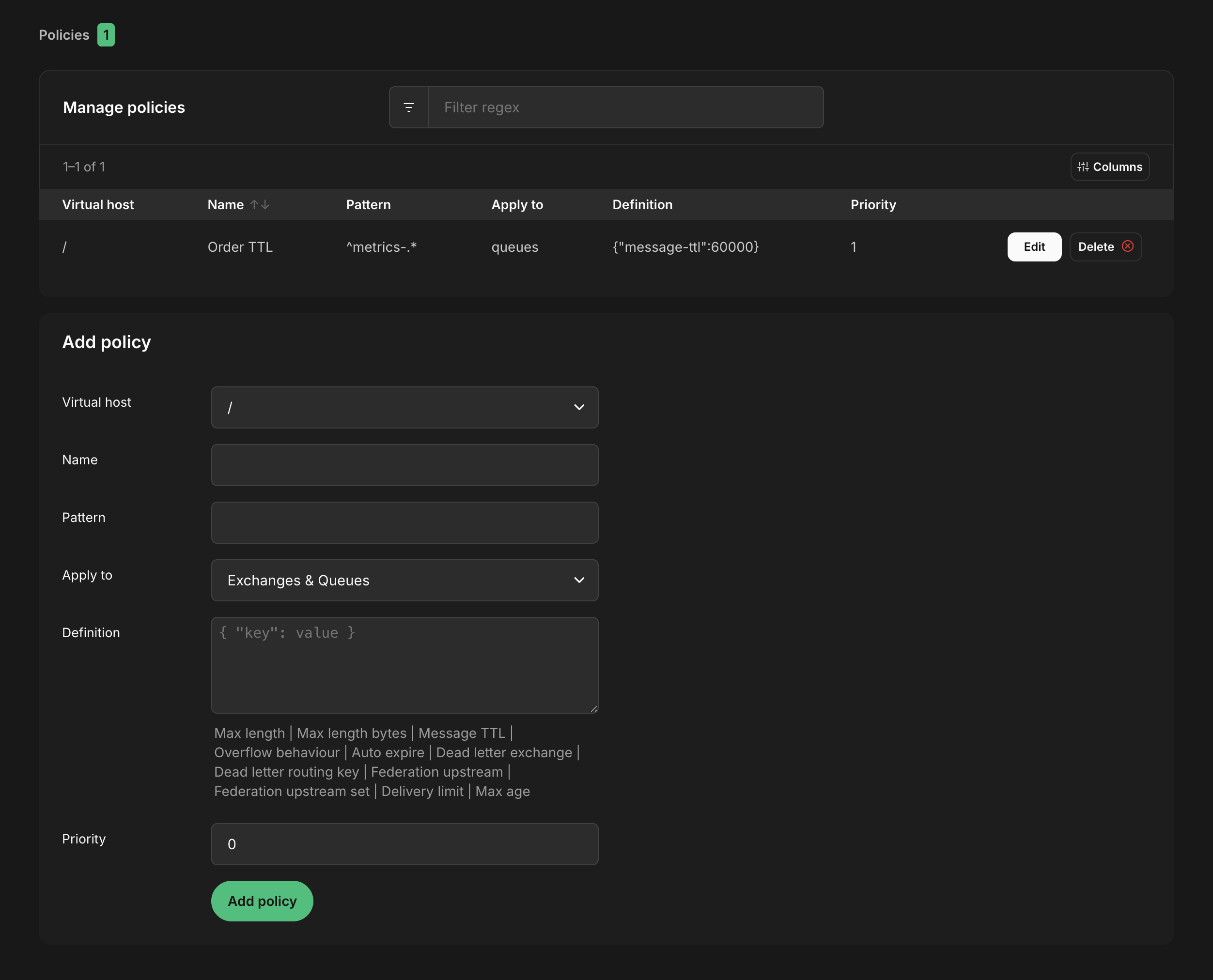
Policies live under Policies in the LavinMQ sidebar. The same page holds the form for creating new ones.
Name, pattern, and definition are required. Clicking any of the suggested keys below the definition box adds it to the JSON — just fill in the value. If two policies have overlapping patterns, set a priority to control which one wins (higher number takes precedence, default is 0).
The screenshot below shows what the policy form looks like after filling in a TTL policy for all queues matching ^metrics-.*.
Policies in lavinmqctl
For scripted or automated setups, lavinmqctl is the fastest way to manage policies without opening a browser.
List policies
List policies by using the command
lavinmqctl list_policies -p vhostname
Create policies
Create a policy by using the command
lavinmqctl set_policy <name> <pattern> <definition>
| Example |
|---|
lavinmqctl set_policy Policy2 '.\*' '{"message-ttl": 60}' |
To specify vhost, priority, and exchange/queue-application use the following syntax
lavinmqctl set_policy <name> <pattern> <definition> -p <vhost> --apply-to <queues|exchanges> --priority 8
| Example |
|---|
lavinmqctl set_policy Policy5 'queue_A' '{"message-ttl": 60}' -p |
Delete policies
Deleting policies is done with the command
lavinmqctl clear_policy <name>
| Example |
|---|
sudo lavinmqctl clear_policy 'Policy1' |
Policies with the HTTP API
The LavinMQ HTTP API makes it straightforward to manage policies programmatically, from deployment scripts, CI pipelines, or any tool that speaks HTTP.
List policies
Policies can be listed with the following API callcurl -u USERNAME:PASSWORD -X GET https://SERVERNAME.lmq.cloudamqp.com/api/policies
Create policies
Policies can be added with the following API callcurl -XPUT -u USERNAME:PASSWORD --header "Content-Type: application/json" --data '{"pattern":"[PATTERN]","definition":{"key":value},"apply-to":"[queues|exchanges]"}' https://host/api/policies/[VHOST]/[POLICYNAME]
Delete policies
Policies can be deleted with the following API call curl -u USERNAME:PASSWORD -X DELETE https://host/api/policies/[VHOST]/[POLICYNAME]
For the full policies reference, see the policies documentation in the LavinMQ repository.
Annie Blomgren