


We built a RAG-based chatbot with LangChain and LavinMQ. Here is how, part 1

When building a Retrieval-Augmented Generation (RAG) system, the focus is usually on a few things: good retrieval, the right embedding model, and accurate, grounded responses. You think about chunking, indexing, prompt design, latency, and cost. The idea of adding a message broker rarely comes up. Would it just add more moving parts, or could it actually help manage the complexity that already exists?
A RAG system can absolutely be built without a queue. The question is not whether that is possible. It is: when does that approach start to break down?
This tutorial starts with a real RAG use case, then walks through what the system looks like without a queue, where it works well, and where it starts to struggle. From there, a queue is introduced not as an assumption but as a response to those problems, examining both the benefits and the trade-offs it brings. Finally, the queue-based version of the system is built, so the approach can be seen in practice.
What is RAG? What is a message queue?
This tutorial assumes some familiarity with RAG and message queues. This is a quick primer to get up to speed, with links to go further.
Retrieval-Augmented Generation (RAG)
The problem it solves: Imagine asking an AI about a product’s features, but it has never seen the docs. It guesses, and sometimes gets it wrong. Retraining the model every time the docs change would be slow and expensive.
What it is: At its heart, RAG is about giving an AI model access to information it does not already know. Instead of relying only on what it learned during training, it looks things up first, then answers.
How it works: Documents are broken into small pieces, turned into embeddings, and stored in a vector database. When a question comes in, the system finds the most relevant pieces and gives them to the model to generate a grounded answer.
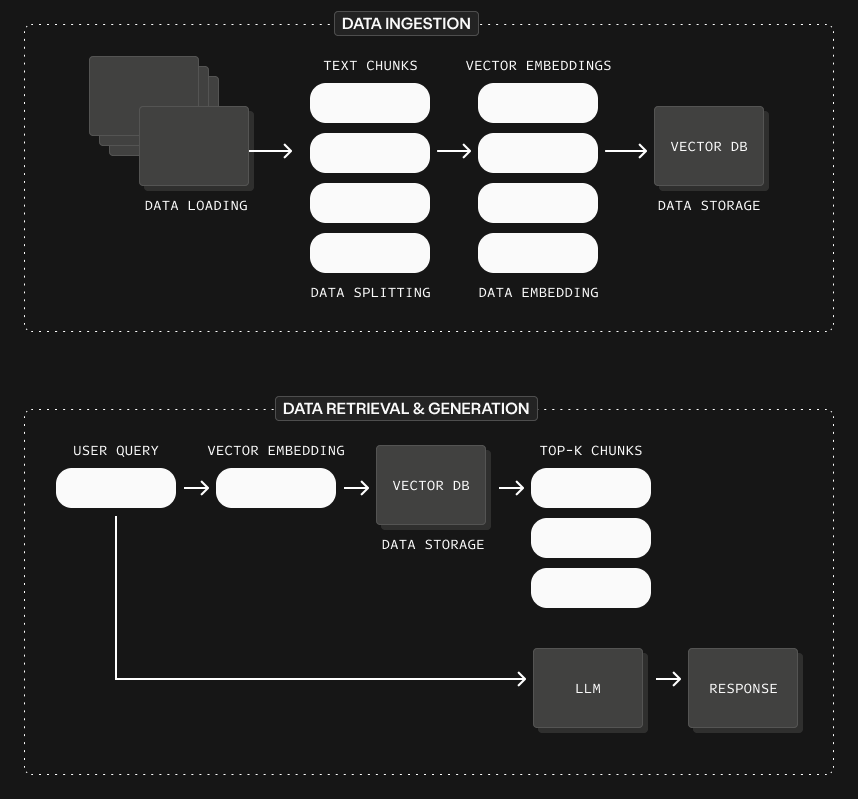
Further reading: What is Retrieval Augmented Generation (RAG)
Message queue
The problem it solves: Imagine multiple parts of a system talking directly to each other. If one slows down or fails, everything else starts to break or wait. A sudden spike in work causes requests to pile up and the system struggles to keep up.
What it is: A message queue is a simple system that holds tasks temporarily as they move from one part of a system to another. Think of it like a post office: messages come in, get lined up, and are delivered when the receiver is ready.
How it works: One part of the system (a producer) sends messages to the queue instead of calling another service directly. Another part (a consumer) picks up those messages and processes them at its own pace, making the system more reliable and scalable.
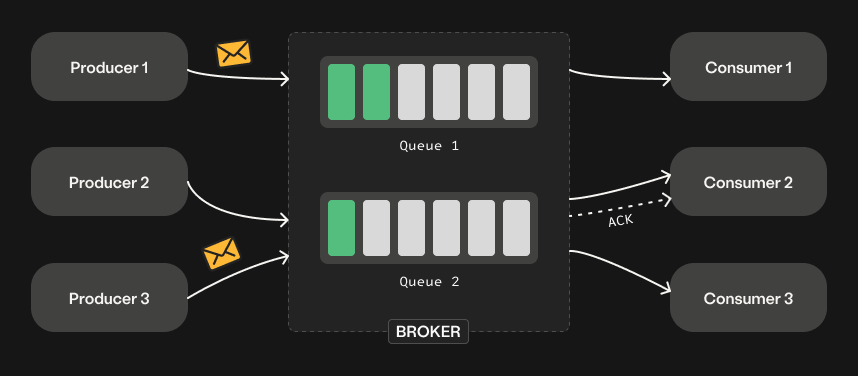
Further reading: What is a message queue?
The demo: a product assistant
This tutorial builds a simple assistant that helps users understand a product and troubleshoot issues by answering questions, using the product’s own docs as its source of truth. In a real system, the source could also include internal docs, past support tickets, forum conversations, and release notes. For this demo, the focus is on product documentation only.
Why this matters
When using a tool, people usually struggle with two things:
- Understanding: What does this feature do? How does this work under the hood?
- Troubleshooting: Why is this failing? What should I check first? This is even harder because errors are often unclear.
The answers exist in docs, blogs, and forums, but they are often long, scattered, and hard to connect to a specific question.
This assistant turns that scattered knowledge into a simple, interactive experience. Instead of searching and piecing things together, a question gets a clear explanation with practical next steps.
Where this could live
- Slack or Discord community: A bot that answers questions in real time, where users already go for help, reducing repeated questions and speeding up support.
- Inside product sites: A chat interface embedded directly in the product page that helps users understand concepts instantly while reading, without leaving the page.
- CLI or terminal: A command-line tool that lets developers ask questions directly from the terminal and get fast, focused answers without breaking their workflow.
This tutorial builds the product-page-embedded version.
The demo architecture
At a high level, this demo does two things:
- In the background, it checks the docs and blog for changes, processes updated pages, and stores them in a vector database.
- When a user asks a question, it searches the knowledge base, retrieves the most relevant pieces, and uses them to generate a grounded answer in the web chat.
Without a queue
Below is what the architecture looks like without a message queue:
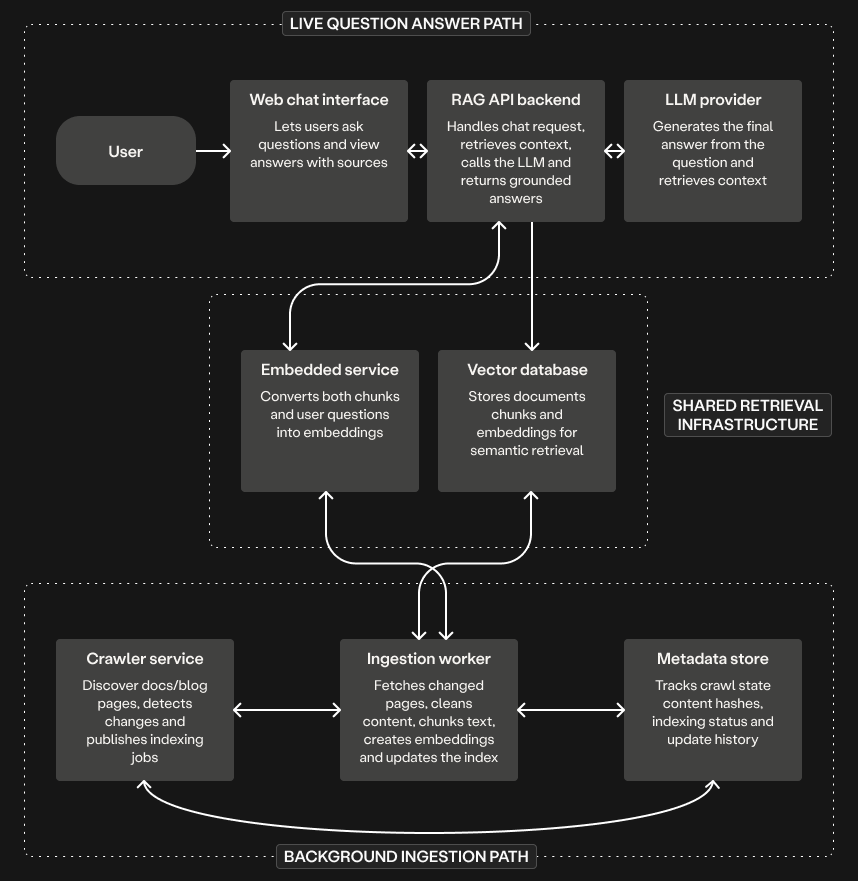
In the live question-answer path:
- The user asks a question in the web chat.
- The RAG API backend retrieves the most relevant chunks from the vector database.
- It sends the question and retrieved context to the LLM, and returns the final answer.
In the background path:
- The crawler checks the docs and blog for new or changed pages and hands that work directly to the ingestion worker.
- The ingestion worker fetches the page, cleans it, splits it into chunks, and creates embeddings.
- The ingestion worker updates the vector database with the embeddings and records the indexing state in the metadata store.
There is a lot to like about this setup. It is easy to understand, and each part has a clear job. For a small demo or a system where pages change only occasionally, this works well. It is also easier to build at first.
Where it starts to break
The crawler and the ingestion service do two different jobs. The crawler notices what changed. The ingestion service fetches those changed pages, processes them, and updates the index. The real issue is when those two services are too tightly coupled: the moment one finds work, the other must be ready to handle it immediately.
- When many pages change at once: A new release updates 20 docs pages. The crawler finds all 20 and immediately hands them to the ingestion service. Without any buffer, it can slow down or struggle to handle all the work at once.
- When a job fails halfway through: The ingestion service fetches and cleans a page, but the embedding step fails due to a temporary API issue. Retry immediately? Skip it? Block other updates? The control logic has to be built from scratch.
- When one service is temporarily unavailable: The crawler detects a changed page, but the ingestion service is down. There is nowhere to store that work. The update is either lost or requires extra logic to retry later.
With a queue
Below is what the architecture looks like with a message queue:
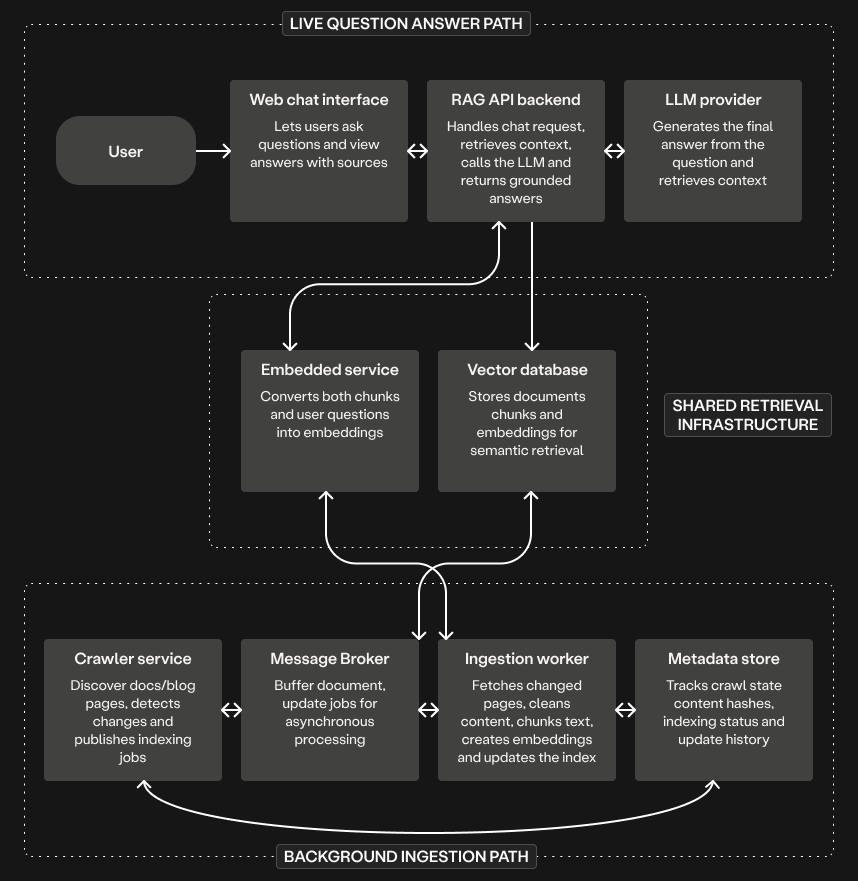
The live question-answer path stays exactly the same. The only change is in the background path. Instead of handing work directly to the ingestion service:
- The crawler checks the docs and blog for new or changed pages.
- The crawler acts as a message producer, publishing each changed page as a job to the message queue.
- The ingestion worker acts as a message consumer, pulling jobs from the queue and processing them at its own pace.
- It fetches the page, processes it, and updates the vector database and metadata store.
This small change introduces a clear separation between finding work and processing work:
- When many pages change at once: The crawler publishes all 20 pages to the queue and moves on. The ingestion worker processes them one by one.
- When a job fails halfway through: The ingestion worker does not acknowledge it, and the queue retries it later. Jobs can be moved to a Dead Letter Exchange after a set number of attempts, so a broken page does not block the rest.
- When one service is unavailable: The crawler can still publish jobs to the queue. The work is not lost. It simply waits until the ingestion worker comes back up.
Conclusion
At first glance, adding a queue to a RAG pipeline can feel like extra complexity. But as we have seen, the real system is already complex. Pages change, jobs fail, workloads spike, and different parts of the system move at different speeds.
By integrating a message queue into the demo’s ingestion pipeline, the key idea is simple: the queue serves as a buffer between the crawler and the ingestion worker. It absorbs spikes in work, isolates failures, and lets each part of the system focus on its own job. This is what makes the difference between a quick demo and a reliable, production-ready AI system.
In Part 2, the full system will be reviewed and run, following this pattern, from the ingestion pipeline to the final chat interface, to see how all the pieces come together in practice.
Nyior Clement