


Concepts and Architecture
Message Queuing Telemetry Transport (MQTT) is a lightweight publish-subscribe (pub-sub) messaging protocol designed for constrained devices and unreliable networks. It is considered lightweight because it requires minimal CPU and RAM.
MQTT is well suited for systems where devices operate under limited resources or unstable network conditions, particularly in IoT, telemetry, and embedded environments. LavinMQ supports multiple protocols, including MQTT, AMQP, and STOMP. MQTT's small code footprint and focus on efficiency make it a natural fit for IoT and mobile applications, such as the Real-time temperature monitoring with LavinMQ project.
LavinMQ supports MQTT 3.1.0 and 3.1.1, allowing MQTT-enabled devices and applications to communicate with the broker over TCP. In MQTT terminology, these devices and applications are referred to as MQTT clients. A client may act as a publisher sending messages, a subscriber receiving messages, or both.
MQTT Architecture
In a typical setup, publishers send messages to MQTT topics, LavinMQ receives and routes the messages, and subscribers listening to matching topics receive copies of the messages.
For example, an IoT sensor may publish temperature readings to a topic named sensors/office/temp, while dashboards, monitoring services, or analytics applications subscribe to that topic to receive the data in real time.
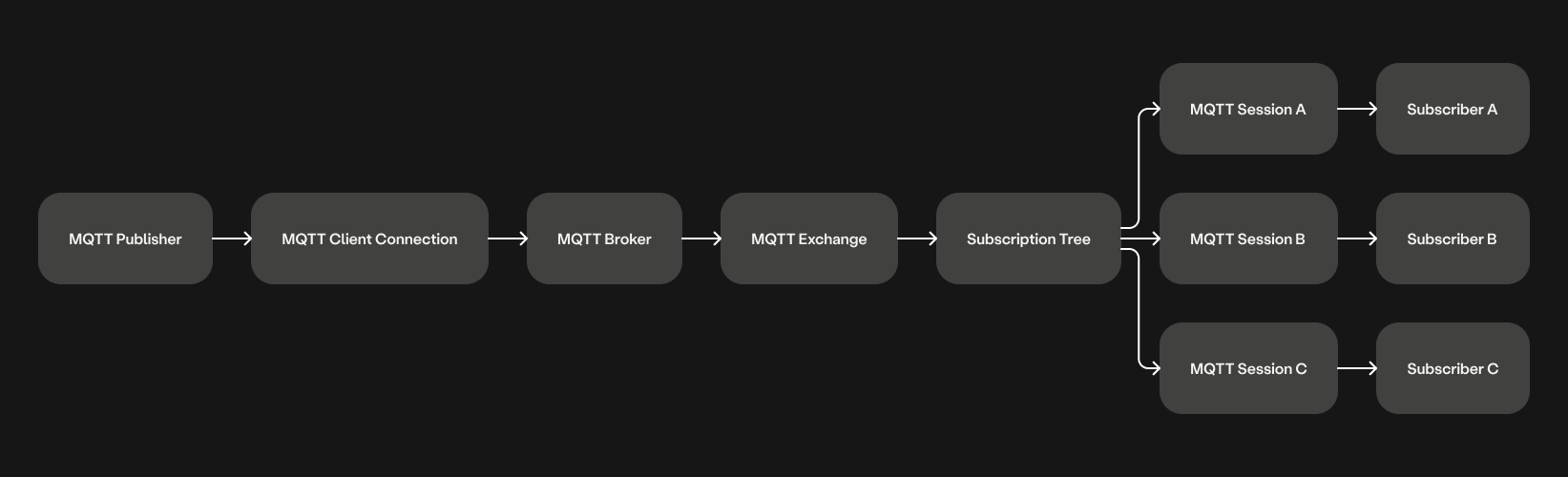
Internally, LavinMQ integrates MQTT into its broker architecture using MQTT-specific exchanges, subscription trees, and session queues. When an MQTT client subscribes to a topic, LavinMQ creates or reuses an MQTT session associated with that client. The session internally behaves like a queue and is bound to the MQTT exchange using the subscribed topic filter.
When a message is published:
- MQTT exchange receives the message
- Subscription tree identifies matching subscriptions
- Message is routed to all matching MQTT sessions
- Each subscriber receives its own copy of the message
This preserves MQTT publish-subscribe semantics while leveraging LavinMQ’s internal queue storage and delivery mechanisms.
Retained MQTT messages are stored separately in the retain store. When a client subscribes to a topic filter, LavinMQ checks retained messages against the subscription pattern and immediately delivers any matching retained messages, including wildcard subscriptions such as sensors/# and sensors/+/temp.
LavinMQ creates a dedicated MQTT broker instance for each virtual host (vhost). This keeps MQTT sessions, subscriptions, retained messages, and routing state isolated between vhosts.
When a client connects, it is attached to the MQTT broker associated with its vhost. This allows multiple independent MQTT environments to coexist within the same LavinMQ deployment while maintaining separation between workloads, permissions, and routing state.
Concepts and Message Flow
The following diagram shows the simplified MQTT message flow inside LavinMQ.
MQTT Client
An MQTT client is any device or application communicating with the broker using the MQTT protocol. A client may publish messages, subscribe to topics, or both. Examples include IoT sensors, mobile applications, dashboards, monitoring systems, and backend services.
Publish and Subscribe
Publishers send messages to topics without needing to know who receives them. Subscribers register topic filters and automatically receive matching messages from the broker. This decouples producers from consumers and allows systems to scale more easily.
Retained Messages
A retained message stores the latest value for a topic.
When a new subscriber connects to a matching topic, the broker immediately sends the retained message.
For example:
Topic: sensors/office/temp
Payload: 25
Retain: true
A newly connected subscriber instantly receives the latest temperature value without waiting for the next publish event.
Clean and Persistent Sessions
MQTT sessions store subscription and delivery state for a client.
Clean Session: A clean session is temporary and removed when the client disconnects.
Persistent Session: A persistent session survives disconnects and allows queued QoS messages to be delivered when the client reconnects.
QoS Levels
MQTT defines Quality of Service (QoS) levels that control delivery guarantees. LavinMQ supports QoS 0 and QoS 1.
QoS 0 delivers messages at most once without acknowledgements. Best suited for high-frequency telemetry and non-critical sensor updates where occasional loss is acceptable.
QoS 1 delivers messages at least once using acknowledgements (PUBACK). Best suited for important telemetry, device status updates, and reliable event delivery. May occasionally produce duplicate messages, so subscribers should handle duplicates safely.
| QoS | Description |
|---|---|
| 0 | Fire-and-forget delivery |
| 1 | Delivered at least once |
| 2 | Delivered exactly once (not supported) |
MQTT Sessions in LavinMQ
Each MQTT client connects using a client identifier (client_id) associated with an MQTT session.
Sessions maintain:
- Topic subscriptions
- Queued messages
- Delivery state
- Unacknowledged QoS messages
MQTT sessions in LavinMQ inherit AMQP queue-like behavior from the broker core, enabling durable storage and reliable delivery semantics for MQTT workloads.
When subscribers connect, messages are routed into matching sessions, and the sessions deliver MQTT publish packets back to connected clients.
Internal Mapping
Internally, LavinMQ routes MQTT traffic through a dedicated MQTT exchange named mqtt.default.
When an MQTT client subscribes to a topic:
- A session is created or reused
- The session is internally bound to the MQTT exchange
- The topic filter is stored in the subscription tree
When a message is published:
- The MQTT exchange receives the publish request
- The subscription tree identifies matching sessions
- The message is routed to all matching sessions
- Sessions deliver MQTT publish packets to connected clients
This design allows LavinMQ to preserve MQTT publish-subscribe behavior while still using reliable queue-based storage and delivery internally.
Connecting MQTT Clients
MQTT clients connect to LavinMQ over TCP using:
- Port
1883for unencrypted MQTT - Port
8883for encrypted MQTT
A client first sends an MQTT CONNECT packet containing:
- Client identifier
- Keepalive settings
- Optional username and password
- Optional Last Will message
After authentication succeeds, LavinMQ returns a CONNACK response and the client session becomes active.
Reliability and Network Considerations
MQTT is designed for unreliable or intermittent networks, and LavinMQ preserves these guarantees through its internal implementation.
Persistent TCP connections and keepalive — LavinMQ monitors active MQTT connections using the keepalive interval negotiated during the CONNECT handshake. If no packet is received within 1.5× the keepalive interval, the connection is closed. This prevents ghost connections from accumulating on the broker.
Retained messages — When a publisher sets the retain flag, LavinMQ stores the message in the retain store. Any client subscribing to a matching topic later receives the retained message immediately, without waiting for a new publish event. This is particularly useful for device state, sensor baselines, and configuration topics.
Persistent sessions — When a client connects with clean_session=false, its session and subscriptions survive disconnections. QoS 1 messages published while the client is offline are stored in the session queue and redelivered when the client reconnects. This ensures delivery continuity over unstable mobile or edge networks.
QoS 1 acknowledgements — LavinMQ tracks unacknowledged QoS 1 messages using packet IDs. If a client disconnects before acknowledging a message, the message is requeued and retransmitted on reconnect. Clients should handle duplicate delivery gracefully.
For details on authentication, TLS, and access control, see MQTT Security.
Ready to take the next steps?
Managed LavinMQ instance via CloudAMQP
LavinMQ has been built with performance and ease of use in mind - we've benchmarked a throughput of about 1,000,000 messages/sec. You can try LavinMQ without any installation hassle by creating a free instance on CloudAMQP. Signing up is a breeze.
Get started with CloudAMQP ->
Help and feedback
We welcome your feedback and are eager to address any questions you may have about this piece or using LavinMQ. Join our Slack channel to connect with us directly. You can also find LavinMQ on GitHub.